

Ignition Page
This content is for the 1.0.0 version. Switch to the latest version for up-to-date documentation.
The Ignition page configures the four power-sequence timers on platforms that have an ignition MCU (the CQ20). On hardware without ignition timers, such as the CQ40 series, the page is greyed out. This page covers the app itself; for what the timers do, their safe ranges, and the power sequence in full, see Ignition Timers.
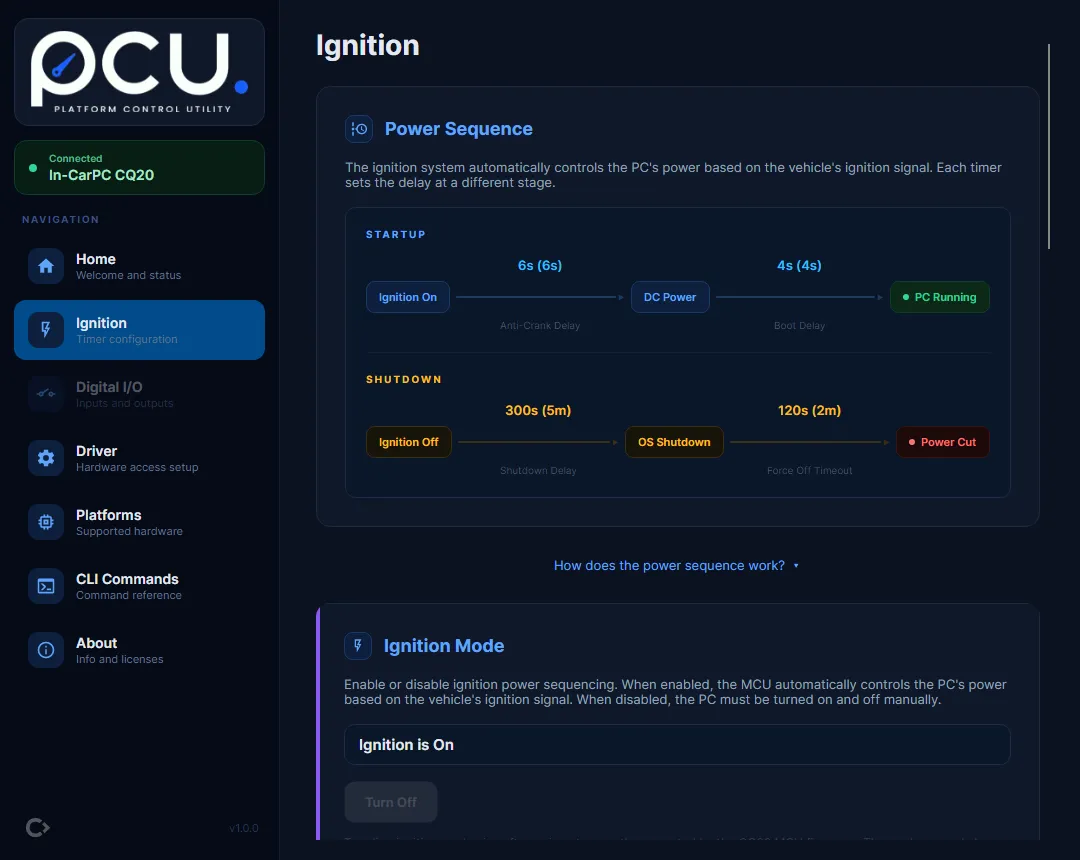
The power sequence
Section titled “The power sequence”The “Power Sequence” card at the top draws a timeline of the startup path (Ignition On to DC Power to PC Running) and the shutdown path (Ignition Off to OS Shutdown to Power Cut), with each timer’s current value shown on the stage it controls. The full description lives on Ignition Timers.
Changing a timer
Section titled “Changing a timer”The “Startup Sequence” and “Shutdown Sequence” cards each hold two timers. Every timer shows its description, its Recommended / Default / Range, and what happens if you set it too low or too high.
To change a timer (for example the Shutdown Delay):
- Open the “Shutdown Sequence” card and find “Shutdown Delay”.
- Choose a value: either a “Quick select” preset (for example “5 min (default)”) or type a number into “Custom value (3-7200 seconds)”.
- Select “Save”.
- In the confirmation dialog, check the value and select “Confirm”. The dialog is titled “Confirm Timer Write” and reads, for example, “Write Shutdown Delay = 120s (2m)?”.
- pcu writes the value, reads it back, and shows “Set to 120s” once the hardware confirms it. The current value updates to the verified reading.
Presets and typed values are checked against the timer’s range before the write, so an out-of-range value is rejected before anything is sent to the hardware.
Ignition mode
Section titled “Ignition mode”Between the power sequence and the timer editors, the “Ignition Mode” card shows whether ignition power sequencing is currently on (“Ignition is On”) or off (“Ignition is Off”). This is read-only in the app.