
Supported Platforms
pcu supports three In-CarPC platform families. Each has a different set of hardware features, so some pages in this documentation apply to one platform and not the others.
| Platform | Hardware feature |
|---|---|
| In-CarPC CQ20 | Ignition power sequencing |
| In-CarPC CQ40 series | Digital inputs and outputs |
| In-CarPC CQ40N series | Ignition power sequencing, with a selectable delay unit |
Platform support is still growing
Section titled “Platform support is still growing”pcu is new software, and the list above is where it stands today, not where it is going. Support is being added in two directions at once:
More models. pcu currently recognises the CQ20, the CQ40 series, and the CQ40N series. Older In-CarPC models are being backported, one family at a time, and more will be supported soon. If pcu does not recognise your machine, that is expected for now rather than a fault.
More features per model. Each platform only exposes the features pcu has implemented for it so far. Digital I/O on the CQ40N series, for example, is a later phase and is not available yet. The feature table below reflects the current release, so re-check it after an update rather than assuming it is fixed.
If your machine is not supported yet, use the CQUtils program preinstalled on the desktop in the meantime. It covers the older models and stays on the machine after pcu is installed, so you are not left without a way to configure the hardware.
Two things that help us:
- If pcu reports an unrecognised board on genuine In-CarPC hardware, send us the
Detected board:line it prints (see below). That line is what we need to add the model. - If you need a specific model or feature sooner, tell us. Contact In-CarPC support with the machine and what you are trying to do, and we will tell you where it sits in the queue.
How pcu detects your platform
Section titled “How pcu detects your platform”Detection is automatic. On startup, pcu reads the board identity that the BIOS reports and matches it against the platforms it knows. There is no platform to pick and nothing to configure.
Before it writes anything to the hardware, pcu confirms the board really is the model it detected. If that check fails, it stops without touching the hardware. This is deliberate: pcu will not write to an MCU on hardware it does not recognise.
If pcu does not recognise the machine, it reports the board it found, for example:
Detected board: Dave's Discount Motherboards / TOASTER-9000along with the list of supported systems. If you see this on genuine In-CarPC hardware, send that
Detected board: line to In-CarPC support.
Feature comparison
Section titled “Feature comparison”| Feature | In-CarPC CQ20 | In-CarPC CQ40 series | In-CarPC CQ40N series |
|---|---|---|---|
| Ignition timers | Yes | No | Yes |
| Delay unit | No | No | Yes |
| Digital I/O | No | Yes | No |
| Firmware and status reporting | Yes | No | Yes |
“Firmware and status reporting” covers the firmware version and the low-level register readout the MCU provides. The CQ40 series does not expose a firmware version, so it does not report one; that is normal, not a fault.
“Delay unit” is a CQ40N feature: most of its timers are counted in a unit you can switch between minutes and seconds. See The delay unit.
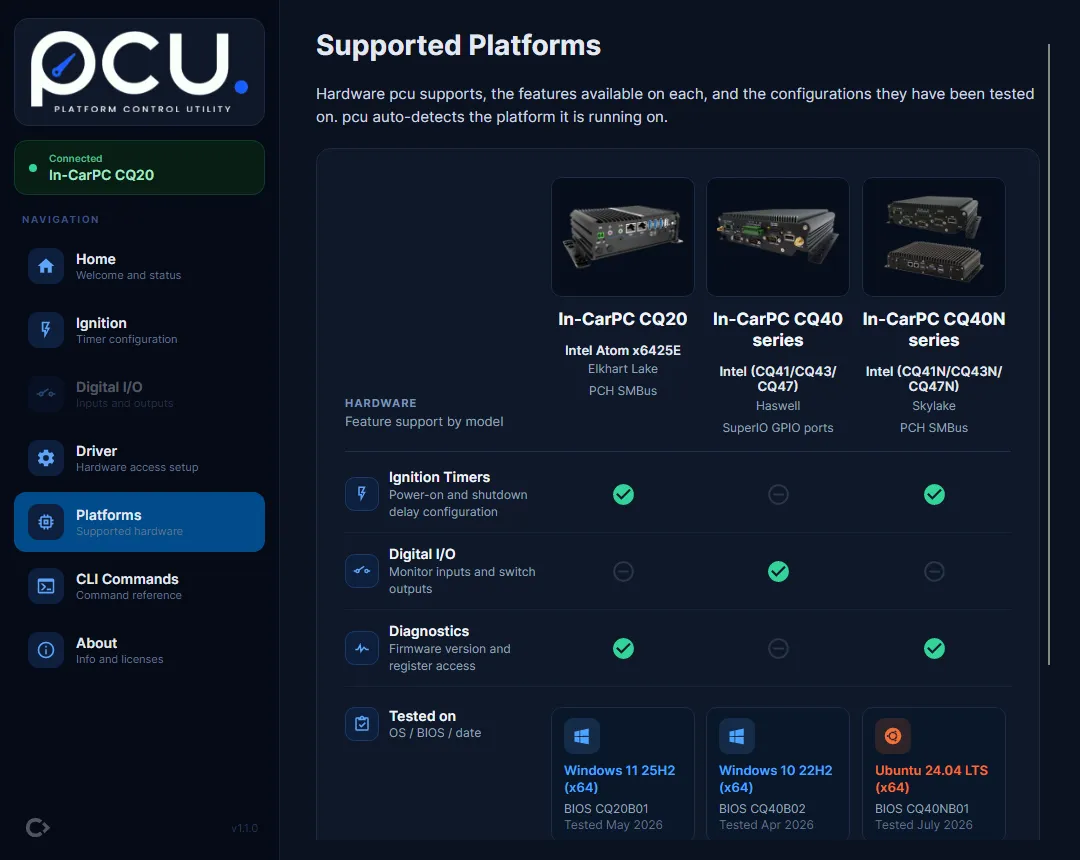
The app shows the same comparison on its Platforms page, with the configurations each model has been tested on:
The pcu-cli status command runs on every platform and prints whatever the connected hardware
supports.
In-CarPC CQ20
Section titled “In-CarPC CQ20”The CQ20 is a fanless Intel Atom x6425E (Elkhart Lake) machine. Its ignition MCU is reached over the PCH SMBus. It provides the four-timer ignition power sequence described in Ignition Timers. It has no digital I/O.
On a CQ20, pcu-cli status reports:
- MCU Identity:
CQ20 MCU - Hardware Rev:
DTB-IGN-MCU VER:10 - Firmware:
12
Tested configurations:
| Operating system | BIOS | Validated |
|---|---|---|
| Windows 11 25H2 (x64) | CQ20B01 | May 2026 |
| Ubuntu 24.04 LTS (x64) | CQ20B01 | May 2026 |
In-CarPC CQ40 series
Section titled “In-CarPC CQ40 series”The CQ40 series covers the CQ41, CQ43, and CQ47 models. They share the same Haswell-era Intel platform and reach their I/O through the SuperIO GPIO ports. It is the only platform with Digital I/O: two digital inputs, two digital outputs, and an ignition sense line. It has no ignition timers.
Do not confuse the CQ40 series with the CQ40N series below. Despite the similar name they are different hardware with different features, and pcu tells them apart automatically.
On a CQ40 series machine, pcu-cli status reports its MCU identity as CQ40 GPIO Controller. The
CQ40 series does not report a firmware version.
Tested configurations:
| Operating system | BIOS | Validated |
|---|---|---|
| Windows 10 22H2 (x64) | CQ40B02 | Apr 2026 |
In-CarPC CQ40N series
Section titled “In-CarPC CQ40N series”The CQ40N series covers the CQ41N, CQ43N, and CQ47N models. They share a Skylake-era Intel platform,
and their ignition MCU is reached over the PCH SMBus, the same bus the CQ20 uses. That matters on
Linux: a CQ40N needs i2c group membership and the i2c-dev module, not the CAP_SYS_RAWIO
capability the CQ40 series needs for its GPIO port I/O. See
Install on Linux.
The CQ40N provides ignition power sequencing with five timers, four of which are counted in a
delay unit you can switch between minutes and
seconds. It has no digital I/O; that is a later phase for this series, so
pcu-cli dio reports the feature is unavailable and exits with code 2. It has no ignition mode
setting either, so nothing is shown for it in the app or the CLI.
On a CQ40N series machine, pcu-cli status reports its MCU identity as CQ40N Ignition MCU. Its
firmware version is shown in the form the MCU reports it, a letter and two hex digits such as R02,
rather than as a plain number.
Tested configurations:
| Operating system | BIOS | Validated |
|---|---|---|
| Ubuntu 24.04 LTS (x64) | CQ40NB01 | July 2026 |
Checking the platform from a script
Section titled “Checking the platform from a script”pcu-cli version --json includes the platform pcu detected, the full list of supported platforms,
and their validated configurations. This is the machine-readable way to confirm what a fleet
machine is before running platform-specific commands. See
Scripting and Automation for the field reference.